Transfer sends one or more files behind a single link, like WeTransfer. Open it from Drive, in the left column. Its storage is separate: a transfer counts neither toward Drive storage nor toward files sent as links from a message. The Transfer icon in the right-hand side panel shows the current transfer (link, counters, time left), and you can also create one there without leaving the webmail.
Send files
- Drop your files on the page, or click to choose them. The total size allowed is shown at the top of the page: 10 GB with the Free plan, 20 GB with Solo and on Voaaro Cloud. On an instance installed by your company, the administrator sets this size (20 GB by default).
- Choose Get a link (you share the link yourself) or Send by email: up to 10 recipients, with a message; each one gets their own link.
- Add a title and a password of at least 4 characters if needed (share it separately), then Transfer or Send.
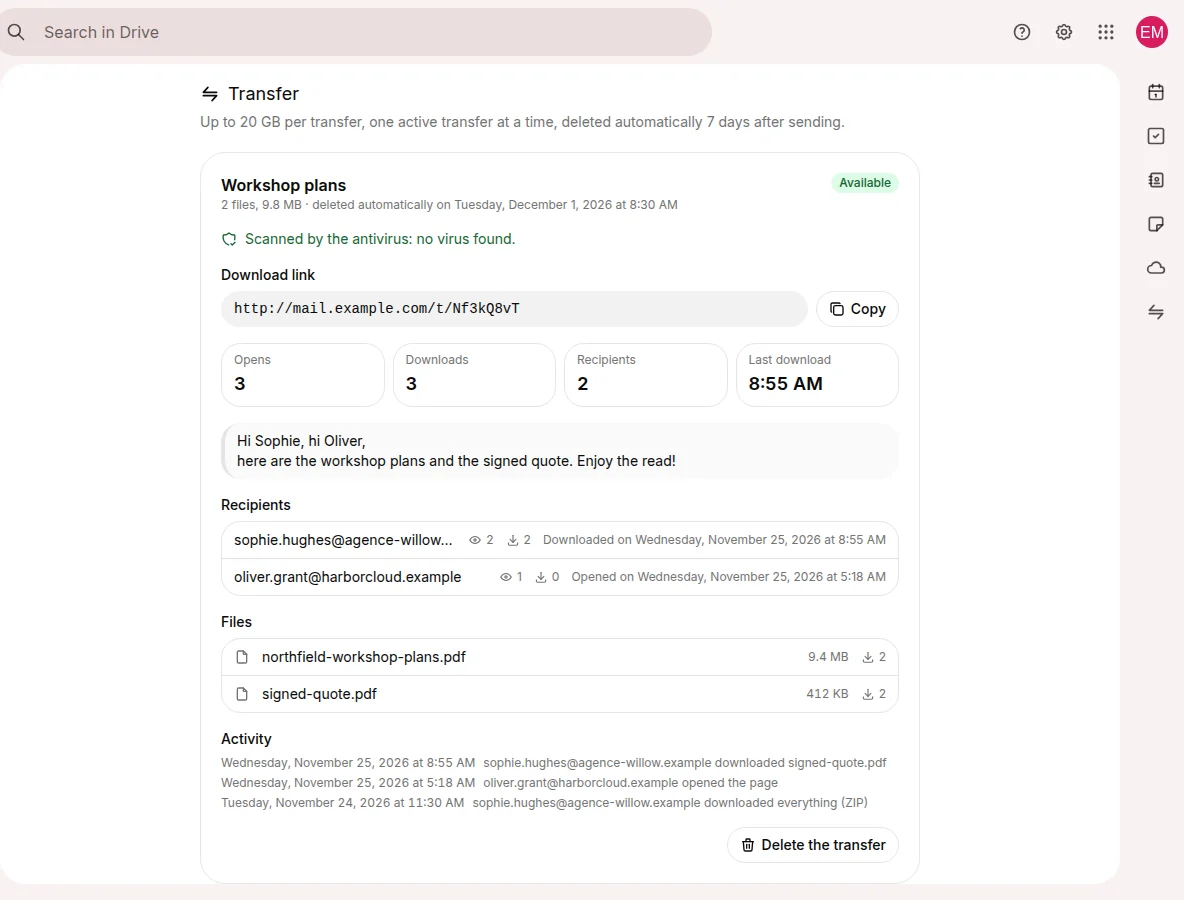
The link is short, like https://mail.example.com/t/Nf3kQ8vT: 8 random characters, without the ones that look alike (0 and O, 1 and l). Copy puts it on the clipboard. An address that tries too many unknown links is blocked for a while, so nobody can guess other people's links. The recipients of an email send count toward your sending limits, with at most 30 transfer recipients per 24 hours.
Every file is scanned by the antivirus before the first download; emails go out once the scan is done. An infected file erases the whole transfer. A file too large for the antivirus is flagged on the download page.
One transfer at a time, one week
- You have one active transfer at a time. On Voaaro Cloud, an organization also has 10 active transfers at most, across all members.
- A transfer is deleted automatically 7 days after sending, for everyone, and it cannot be extended. Delete the transfer erases it right away; you can then create another one.
- Previous transfers stay in the history for 30 days, without their files.
Track downloads
The page shows the opens of the download page, the downloads and the date of the last one. For an email send, each recipient has a line: sent, opened, downloaded. The Activity log lists who opened or downloaded what, and when. You get an email at the first download.
Download page
The recipient sees your name and address, the title, the message, the list of files and the expiry date, in their language. They download each file separately, or Download all as a ZIP archive. With a password, nothing is shown before it is entered; attempts are limited.
Transfer or send as link?
Voaaro has two ways to send a file too large for an email:
- Send as link, in the compose window (see Attachments and large files): the link is inserted into your message, you choose how long it lasts, and your links are listed in Settings › Shared files.
- Transfer: one or more files behind a single page, without writing a message, with statistics per recipient and deletion fixed at 7 days.
A transfer reduces neither your quota of files sent as links nor your Drive storage. To keep a file or share it with your colleagues, put it in the Drive instead.
For the administrator
On an instance installed on your own server, the Storage page of the administration has a Transfer card: Allow file transfers, Maximum transfer size (GB) (20 by default) and Active transfers per organization (empty: no cap). On a public service, each plan sets its own size; 0 leaves Transfer closed, and the page then shows "Transfer is not included in your plan".