A shared mailbox (contact@example.com, support@example.com) belongs to a team. A delegated mailbox is the personal mailbox of a colleague who gave you access to it. Both open from the Shared mailboxes section of the sidebar or the "Switch mailbox" menu, each with its unread count; My mailbox (or Back to my mailbox) takes you home.
Creating a shared mailbox and its distribution rules are handled by the administrator: see Shared mailboxes and routing.
What you see
In a shared mailbox, you only see the messages assigned to you (by a rule, by default, or because you receive everything): the banner at the top reminds you, along with your access level.
- Read only: read, mark as read or unread.
- Read and reply: also sort, label, delete, reply and write from the mailbox's address.
- Manage: also the members, settings, vacation responder and filters of the mailbox.
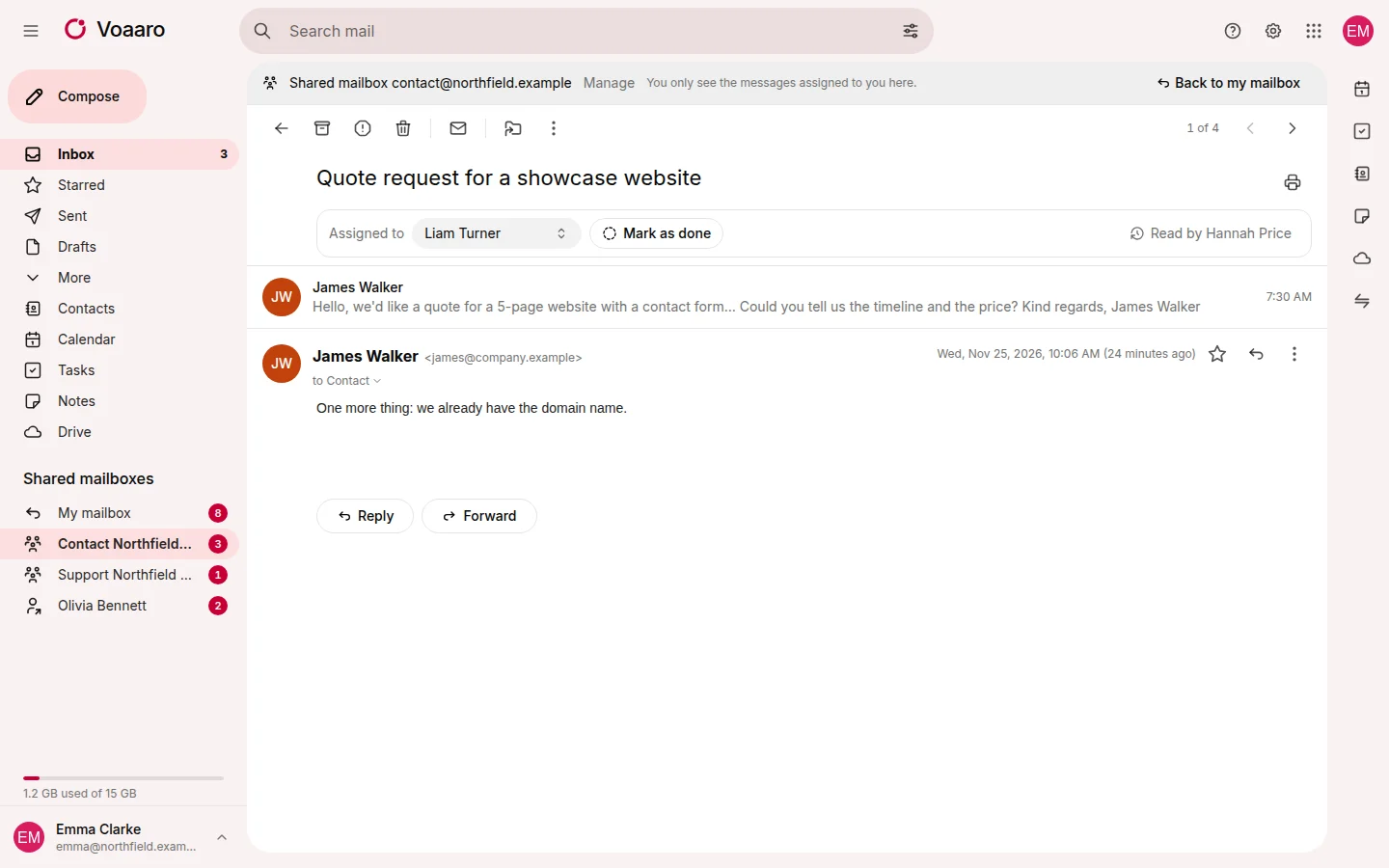
Working together on a conversation
Above a conversation in the shared mailbox:
- Assigned to: the member handling it (searchable list); their name appears in the list.
- Mark as done: the "Done" chip shows in the list for the whole team.
- Activity: who read it, who replied, who assigned or filed it, and when.
A reply is sent from the mailbox's address (the From field always shows it) and is filed in the mailbox's Sent folder. You can't switch mailbox while a compose window is open.
Your preferences
Settings › Accounts › Shared and delegated mailboxes lists your mailboxes, with for each one:
- Notifications: whether to receive notifications for its new messages (according to your settings in Settings › General);
- I receive: Everything assigned to me, Only what a rule assigns to me or Nothing; "Set by the administrator" if this choice is locked;
- Members… for managers: add a colleague from the same domain, change their rights, remove them.
Delegate your mailbox
In Settings › Accounts › Grant access to your account, add the address of a colleague from your domain and choose:
- Read only;
- Read and send (“sent by” the delegate): your contacts see that they are writing on your behalf;
- Read and send in my name.
Your delegate sees neither your settings nor your password. Remove takes access back right away; on their side, they can Give up a delegation.
In an IMAP app
A shared mailbox's folders appear in your IMAP app under "Shared Folders", limited to what is assigned to you. To reply from the mailbox's address, use the webmail.