Members of your public service can pay for a plan with your Stripe account: the money reaches you, Stripe issues receipts and invoices, and Voaaro applies the plan as soon as Stripe confirms. Both editions allow it. This Stripe account is yours: it has nothing to do with buying your Voaaro licence.
You first need a public service and its plans (see Public service and plans).
Create the keys at Stripe
- In the Stripe dashboard, stay in test mode to start with.
- Developers › API keys: preferably create a restricted key (
rk_test_…) with write access to Customers, Products, Prices, Checkout Sessions, Customer portal, and read access to Subscriptions and Balance. Ask_test_…secret key works too. - Developers › Webhooks › Add endpoint: the URL is shown on Voaaro's Payment page (
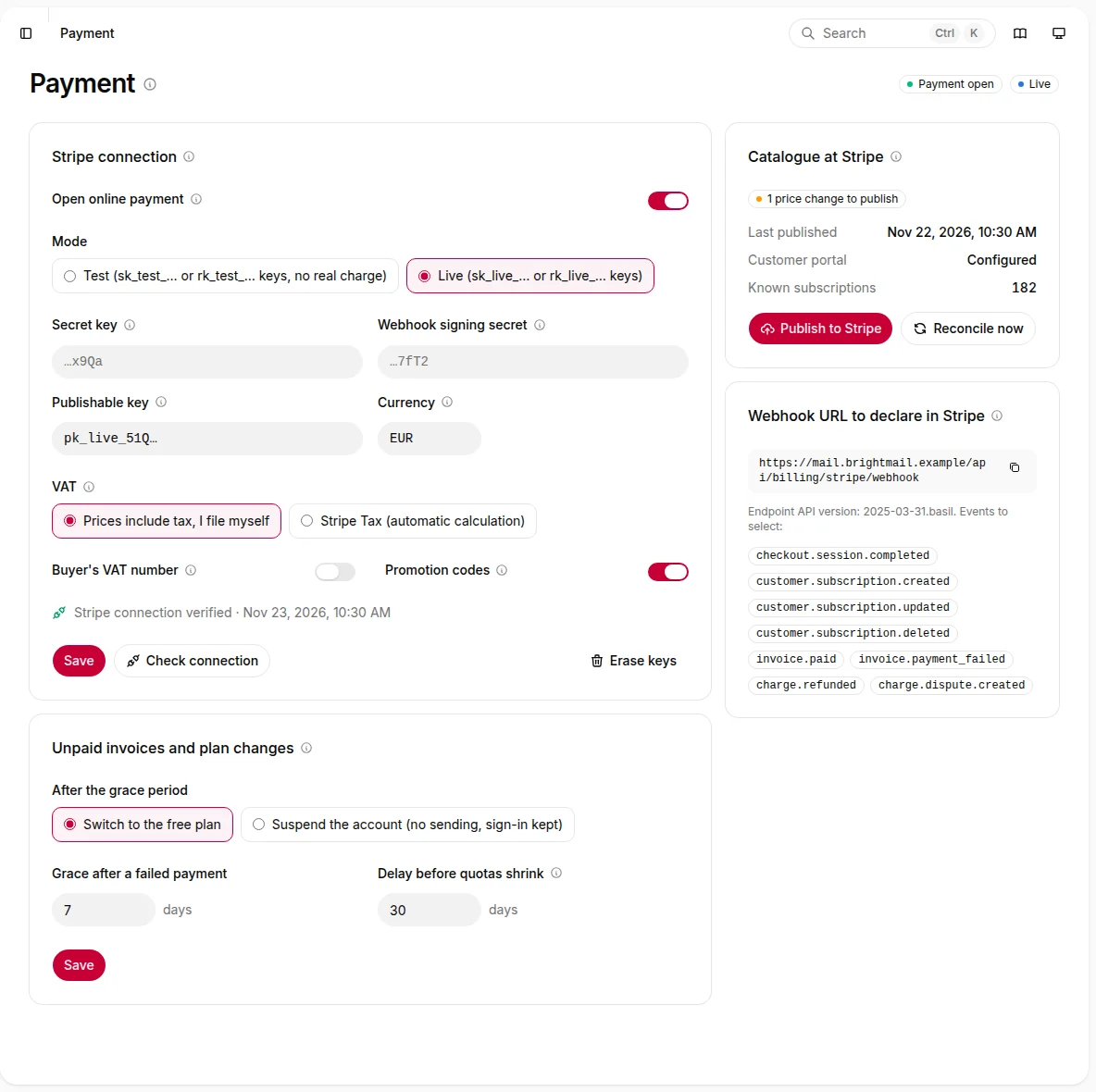
https://<your console>/api/billing/webhooks/stripe). Choose the API version shown (2025-03-31.basil) and select the listed events:checkout.session.completed,customer.subscription.created,customer.subscription.updated,customer.subscription.deleted,customer.subscription.trial_will_end,invoice.paid,invoice.payment_failed,invoice.payment_action_required,charge.refunded,charge.dispute.created,charge.dispute.closed. - Copy the endpoint's signing secret (
whsec_…).
Configure payment in Voaaro
Plans and subscriptions › Payment (billing.manage permission, instance-wide):
- Mode test or live: the key must match it. Switching mode requires that mode's key and webhook secret (each mode has its own endpoint at Stripe).
- Secret key, webhook secret and, optionally, publishable key: encrypted at rest, never shown again (last 4 characters only), never written to the audit log.
- Currency of new prices.
- VAT: Prices include tax (default: you file yourself) or Stripe Tax (automatic calculation, to enable in Stripe with your registrations). Voaaro calculates no tax; your obligations depend on your country, have them checked.
- Buyer's VAT number and promotion codes (created in Stripe): asked on the payment page.
- Check the connection reads the account balance (no effect at Stripe) and checks the mode.
- Open online payment: without it, paid plans stay visible without a "Choose" button.
Prices and publishing
In Plans, a paid plan's form holds a monthly and/or yearly price (tax included) and the length of the card-free trial (14 days suggested; 0: no trial). Nothing goes to Stripe before Payment › Publish to Stripe, which:
- creates one product per paid plan and one price per period;
- for a changed price, creates a new price and archives the old one: current subscribers keep their price;
- configures Stripe's customer portal: card, invoices, cancellation at period end (no refund), switching between published prices (upgrade right away with proration, downgrade at period end).
Publishing twice in a row creates nothing more.
What members do
In Settings › Plan, they pick the period (monthly or yearly) then Choose (or Try for 14 days):
- first time: Stripe's secure payment page opens; during the trial no card is asked. Without a payment method at the end of the trial, Stripe cancels and the account returns to the free plan. The trial works only once per account and per external address (recovery address), even if the payment page is abandoned;
- already subscribed: Stripe shows the prorated amount of the change and asks to confirm it;
- Switch back to this plan on the free plan opens Stripe's cancellation; the paid plan stays until the end of the period;
- Manage billing opens the customer portal (card, invoices, cancellation).
Back from Stripe, the page waits for the confirmation (a few seconds). The browser never chooses an amount: only a plan and a period.
How Voaaro follows Stripe
- Each webhook is verified (signature over the raw body, 5 minutes at most), recorded once (a replay has no effect), then Voaaro re-reads the subscription at Stripe: the order in which events arrive does not matter. An event from the other mode is ignored.
- The plan and its quotas follow the subscription (trial, active, payment overdue); storage is copied to the mailbox. A plan you grant to an account by hand is not removed by an old subscription.
- A daily reconciliation re-reads subscriptions at Stripe and fixes a lost webhook; Reconcile now runs it right away.
- Audit log:
billing.settings,billing.publish,billing.checkout,billing.subscription,billing.reconcile,plan.prices.
Before going live
Test everything in test mode (card 4242 4242 4242 4242, stripe listen --forward-to …/api/billing/webhooks/stripe), then switch to live with an rk_live_… key and the live endpoint's secret, and publish the catalogue again (test products and prices do not carry over to live mode).
Sign-up with a paid plan
On the public domain's Create an account page, people can choose a paid plan (and its period): the account is created, then Stripe's payment page opens.
- Addresses shorter than 6 characters (3 at least) are reserved for paid plans.
- If the service has no free plan, a paid plan is required.
- In both cases the account waits for its first payment: it only opens once paid (no trial), and it is deleted after 24 hours without payment (the address becomes free again).
- The card-free trial requires a verified external address: the one from sign-up, or the verified recovery address.
Unpaid invoices and plan changes
Payment › Unpaid invoices and plan changes:
- Grace after a failed payment (7 days suggested): Stripe retries the card (set up Smart Retries at Stripe); the subscriber keeps their plan, gets an email and sees a banner.
- After the grace period: switch to the free plan, or suspend the account (no sending from webmail or API keys, sign-in and messages kept; the mailbox stops receiving after 30 days; everything is restored on payment).
- Delay before quotas shrink (14 days suggested): after a downgrade (cancellation, unpaid invoice, smaller plan), storage, secondary addresses and shared files stay as before; at the deadline storage is reduced and secondary addresses beyond the limit are disabled (most recent first, can be re-enabled). No message is ever deleted.
Deadlines are checked every hour.
Notices, banners and invoices
Subscribers get an email (in their language, to their mailbox and verified recovery address), only once, for: the end of their trial (3 days before), a failed payment, a payment to confirm (3-D Secure, with the Stripe link) and a suspension. The same notices show as banners in their webmail and in Settings › Plan, which also lists their invoices (issued by Stripe, with a link to Stripe's page to pay or view them).
Refunds and disputes
A refund made in Stripe is recorded in the audit log (billing.refund). A bank dispute immediately removes the account's paid plan and shows on the Payment page; respond to it in your Stripe dashboard.
Subscribers and revenue
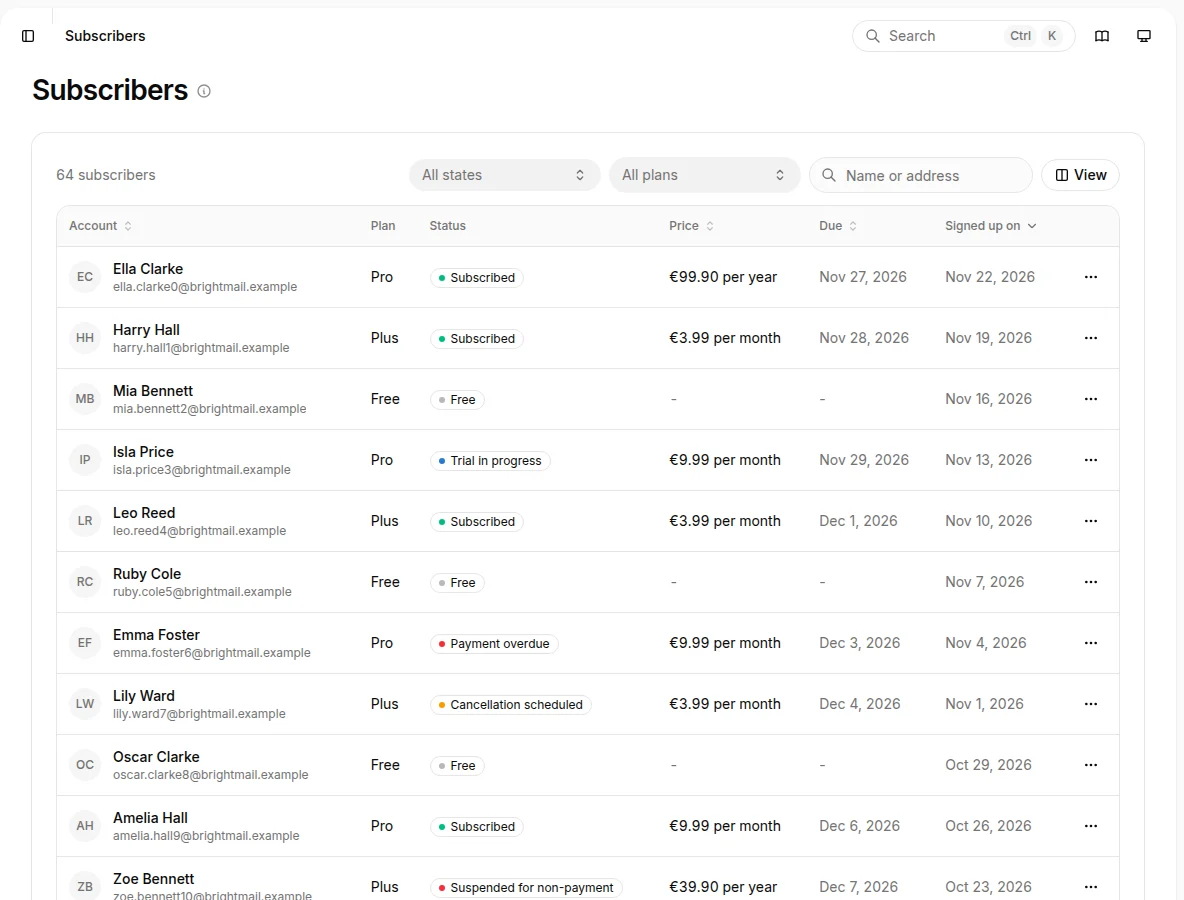
Plans and subscriptions › Subscribers lists the public service's accounts: plan, state (subscribed, trial, cancellation scheduled, payment overdue, suspended, awaiting payment, ended, free), price and due date, with filters. A subscriber's record shows their subscriptions, invoices and payments (read back from Stripe) and lets you:
- grant a plan (no payment,
plan.managepermission); - refund a payment, fully or partly (
billing.managepermission): Stripe refunds, the plan does not change; - cancel the subscription at period end, or right away (no automatic refund).
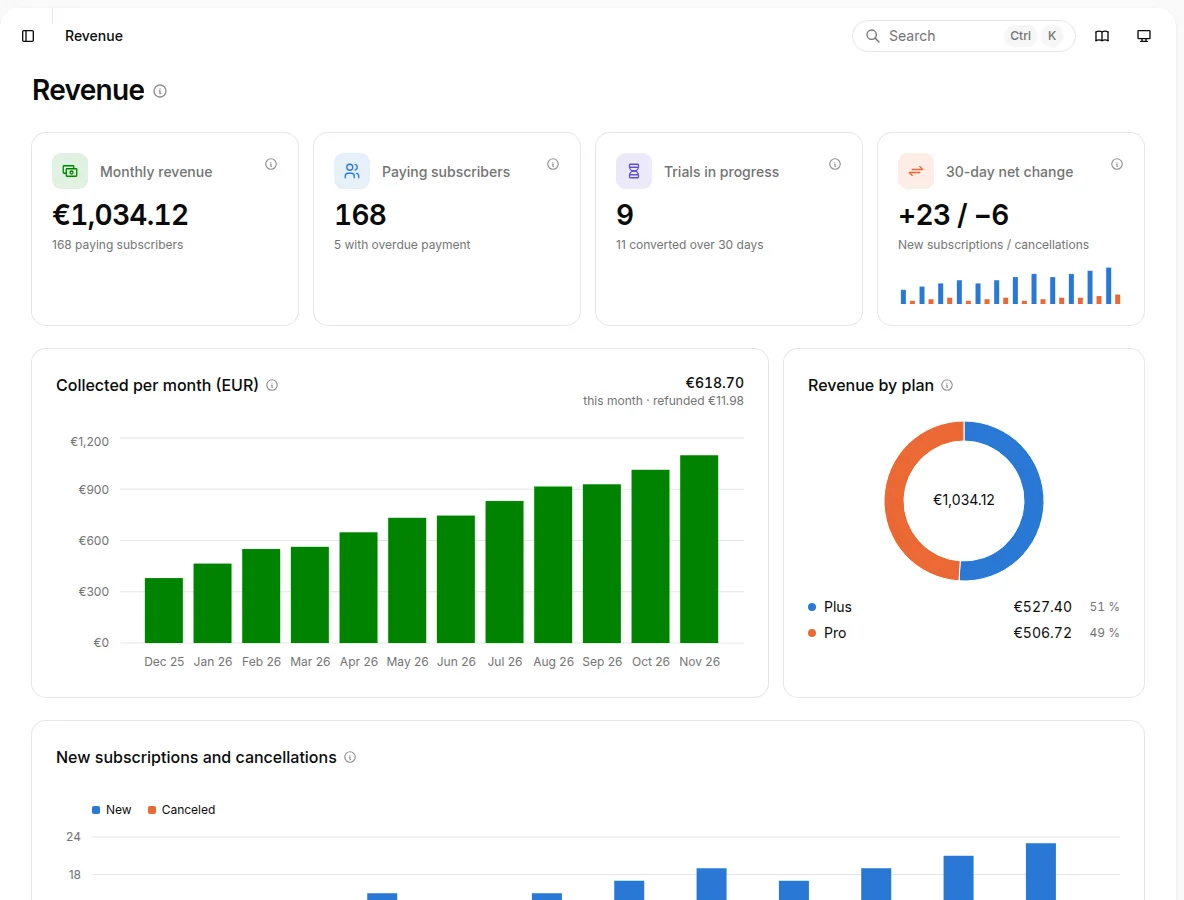
Revenue shows monthly recurring revenue per currency (a yearly price counts as one twelfth; trials and disputed payments do not count), paying subscribers, trials and overdue ones, new subscriptions and cancellations over 30 days, what was collected and refunded this month, and the breakdown per plan. A Subscriptions card sums it up on the dashboard; the Users page shows each account's plan.
When a subscriber deletes their account, their subscription stops renewing; at the actual deletion (14 days later, or by an administrator), their customer is deleted at Stripe and the subscription ends at once, with no refund.
The record also lets you extend a trial (1 to 90 days) and suspend or reactivate the account. Subscribers are warned when their mailbox reaches 80, 95 then 100% (email once per threshold, banner). An account suspended for non-payment can no longer send, including from a mail app (the server refuses recipients). A won dispute (charge.dispute.closed event, to select as well) gives the paid plan back.